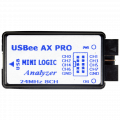
I bought a MCU123 USBee AX Pro clone on dx.com which is very similar to a Saleae Logic.

To use it with the Saleae software, the VID/PID need to be reprogrammed.
The procedure is well explained here if you have Windows. If you have Linux, continue to read.
As explained in the Windows version of this tutorial, you have to flash the device with a special firmware that enables to read/write the EEPROM where the VID/PID are stored.
- Install and compile some tools
$ sudo aptitude install fxload
$ sudo aptitude install libusb-1.0-0-dev
$ git clone https://github.com/ribalda/fx2eeprom.git
$ cd fx2eeprom
$ make
- Identify the USB bus and device numbers
$ lsusb
...
Bus 001 Device 017: ID 08a9:0014 CWAV Inc. USBee AX-Pro
...
- Flash the device
sudo fxload -D /dev/bus/usb/001/017 -t fx2lp -I vend_ax.hex
- Read the first 8 bytes from the EEPROM
sudo ./fx2eeprom r 0x08a9 0x0014 8 > eeprom.dat
- Edit the VID/PID from the dump with your favorite hex editor
- Before edition
$ hexdump -C eeprom.dat.bak
00000000  c0 a9 08 14 00 00 1b 00                           |........|
00000008
- After edition
$ hexdump -C eeprom.dat
00000000  c0 25 09 81 38 00 1b 00                           |.%..8...|
00000008
- Write the new EEPROM
cat eeprom.dat | sudo ./fx2eeprom w 0x08a9 0x0014 8
- unplug&plug your device and enjoy
$ lsusb
...
Bus 001 Device 019: ID 0925:3881 Lakeview Research Saleae Logic
...
In case it doesn’t work, your next step is probably there.
As a side note and without surprise: cheap hardware => cheap results. Don’t expect to have a perfect sampling above 1 MHz. It’s fine for general debugging with an Arduino or Raspberry Pi but otherwise, I’m personally waiting for Saleae to ship their new Logic Pro 8.
1 linkback (pingbacks from WordPress)