📺 LAN Screen + Audio sharing

This is my conf to stream my Linux desktop screen in my apartment using VLC. Server side The vlm configuration It captures my left screen and audio from pulseaudio. Video is encoded with X264 tuned for zerolatency. Audio is encoded in MP3. The element streams are encapsulated in a Transport Stream over RTSP. new Remote vod setup Remote input screen:// setup Remote option screen-fps=25 setup Remote option screen-caching=50 setup Remote option screen-top=0 setup Remote option screen-left=0 setup Remote option screen-width=1280 setup Remote option screen-height=1024 setup Remote option input-slave=pulse:// setup Remote option sout-udp-caching=50 setup Remote option udp-caching=50 setup Remote option rtsp-caching=50 setup Remote option tcp-caching=50 setup Remote output #transcode{vcodec=h264,venc=x264{tune=zerolatency,crf=30},acodec=mp3,ab=128}:rtp{mux=ts,description='screen',sdp=rtsp://:8888/remote.sdp} setup Remote enabled # extra venc option #preset=ultrafast # extra scaling #transcode{scale=1,fps=25,width=640,height=480} # extra output format #std{access=http,mux=ts,dst=localhost:8888} #std{access=file,mux=ts,dst=/tmp/remote.ts} #rtp{mux=ts,description='screen',sdp=rtsp://:8888/remote.sdp} The VLC command line cvlc --ttl 2 -vvv --color --vlm-conf screen.vlm Client Side The VLC command line vlc rtsp://localhost:8888/remote.sdp
March 20, 2014 · 1 min · 146 words · ticapix

🔧 LCD repair

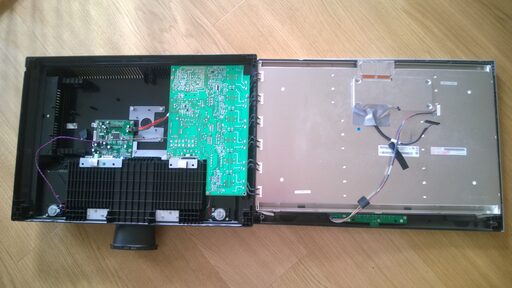
In 2009, I bought an Iolair MB24W, one of those with a MVA display. Except the time when I had to reset the screen to restore the EDID (Press M, +, - until the blue LED blinks 3 times), the screen works fine … until recently. The screen switches on but stays white. No picture at all, not even the OSD menu. Let’s look inside. Maybe it’s a disconnected cable like most forums will suggest. ...

March 6, 2014 · 1 min · 147 words · ticapix

💡 Blync 2: driving it from the terminal

Following on from the first part of the Blync hack, I want to be able to control the color from a terminal. Let’s create a simple protocol Command Input in byte Output in byte Default mode 0..7: 0 (AUTO) no output Get current RGB value 0..7: 1 (GET) 0..7: Red as [0..255] 8..15: Green as [0..255] 16..23: Blue as [0..255] Set RGB value 0..7: 2 (SET) 8..15: Red as [0..255] 16..23: Green as [0..255] 24..31: Blue as [0..255] 0..7: 1 (ACK) Here is the demo code in Python using pyserial. ...

March 5, 2014 · 1 min · 143 words · ticapix

🎛️ Blync 1: reverse-engineering the USB cube

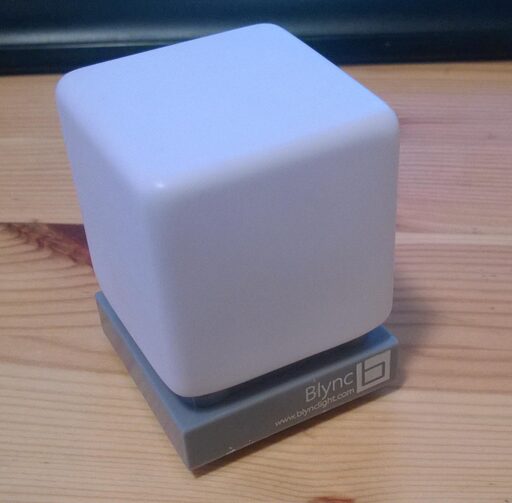
There is a funny little USB gadget called the Blync identified by VID: 0x1130, PID: 0x0001. It’s a glowing RGB cube, but it has two defects for me: the driver is only available for Windows only 7 colors are available Let’s fix it. Software hack That’s the easy part. Plug your Blync under Windows running in a virtual machine. Start Wireshark under the Linux host Dump USB packets Think Replay packets in Python And Voilà: https://github.com/ticapix/blynux ...

March 3, 2014 · 3 min · 521 words · ticapix

✅ Pretty Check

Code #!/bin/sh function prettycheck { local TPUT='tput' local RED='1' local GREEN='2' local BLUE='4' #man 5 terminfo [ ! -f $(which $TPUT) ] && TPUT=true cmd="$@" echo "$> $cmd" $TPUT cuf $((`$TPUT cols` - 8)) # move the end-of-line minus 8 cols $TPUT cuu 1 # move on line up msgerr=$($cmd 2>&1 1> /dev/null) if [ "$?" -ne 0 ]; then $TPUT setaf $RED # change front color echo "[FAILED]" $TPUT setaf $BLUE # change front color echo "$msgerr" else $TPUT setaf $GREEN # change front color echo "[ OK ]" fi $TPUT reset } Demo

March 3, 2013 · 1 min · 95 words · ticapix

🛸 Close Encounters of the Third kind

Re, Mi, Do, Do, Sol beep -l 500 -f 392 -n -l 500 -f 440 -n -l 500 -f 349.2 -n -l 500 -f 174.6 -n -l 500 -f 262.6

March 3, 2013 · 1 min · 30 words · ticapix

🩹 Kernel Patch

Yeah 🙂 Read MAC for TeVii S470 PCI-e DVB-S2 card v4l/firmware/Makefile

March 3, 2013 · 1 min · 11 words · ticapix
