🧱 Unbrick and update a J-Link V8 clone

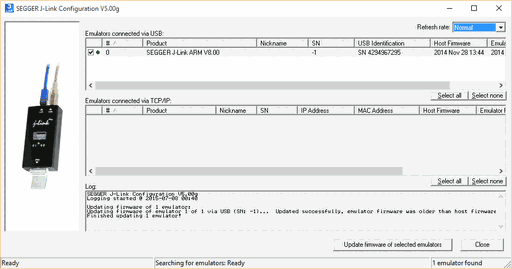
You can buy a Segger JTAG J-Link clone for a few USD on ebay, aliexpress, dx, … If you try to update its firmware with the official Segger tool, you’ll brick the probe. Don’t worry, smart people have already put a checklist to restore a working firmware and even update it to the latest official version. I just put all the needed info into one single page. Unbrick it To restore the firmware, you need to follow the instructions from http://www.sonsivri.to/forum/index.php?topic=41726.50. The best part? It works from Linux. ...

July 9, 2015 · 3 min · 601 words · ticapix

🎧 Use Creative Zen Stone on Windows 8/10

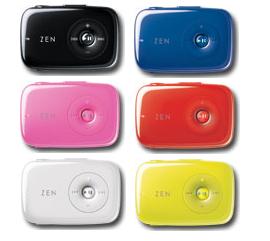
Remember those? Install 7zip. Download Creative ZEN Stone Firmware 1.06.01 Right-click on the file downloaded at Step 2, ZENStone_PCFW_US_1_06_01.exe and extract its content using 7zip. Go inside the newly created folder ZENStone_PCFW_US_1_06_01/vista Right-click on StMp3Rec.inf -> Install Same with StMp3Recx64.inf Unplug&Plug your Stone. Done

March 28, 2015 · 1 min · 44 words · ticapix

💽 Create Bootable Windows USB Flash Drive

I assume that you have a basic understanding of: unzipping a file, mounting an ISO file, opening the Command prompt in Administrator mode and booting your PC from a USB flash drive. Either unpack or extract or mount your ISO file, let’s say in %USERPROFILE%\win_files Insert your USB drive. Open CMD in Administrator mode and type diskpart Microsoft DiskPart version 10.0.10041 Copyright (C) 1999-2013 Microsoft Corporation. On computer: XXXXXXXXX DISKPART> list disk Disk ### Status Size Free Dyn Gpt -------- ------------- ------- ------- --- --- Disk 0 Online 238 GB 0 B * # my HDD drive Disk 1 Online 14 GB 0 B # my USB drive DISKPART> select disk 1 Disk 1 is now the selected disk. DISKPART> clean DiskPart succeeded in cleaning the disk. DISKPART> create partition primary DiskPart succeeded in creating the specified partition. DISKPART> active DiskPart marked the current partition as active. DISKPART> format fs=ntfs quick label="win installer" 100 percent completed DiskPart successfully formatted the volume. DISKPART> assign DiskPart successfully assigned the drive letter or mount point. DISKPART> exit Leaving DiskPart... A new Removable Disk should be showing up, named as ‘win installer’ with, let’s say, letter E:\ Go into the boot\ subfolder of where the installation files have been extracted at Step 1, in my case: cd %USERPROFILE%\win_files\boot We want to make the USB flash bootable with E: the USB drive letter from Step 5. C:\Users\ticapix\win_files\boot> bootsect.exe /nt60 E: Target volumes will be updated with BOOTMGR compatible bootcode. E: (\\?\Volume{a91720d2-a87d-11e4-ab33-3c970e90bd43}) Successfully updated NTFS filesystem bootcode. Bootcode was successfully updated on all targeted volumes. Copy the content of the folder from Step 1 onto the USB flash drive with xcopy xcopy %USERPROFILE%\win_files\*.* E:\ /E /F /H The syntax is xcopy with the following options: /E Copies directories and subdirectories, including empty ones. /F Displays full source and destination file names while copying. /H Copies hidden and system files also. Once the copy is done, safely unplug the USB drive and boot your PC from it.
March 27, 2015 · 2 min · 330 words · ticapix

🔌 USBee AX Pro reprogramming

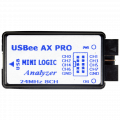
I bought a MCU123 USBee AX Pro clone on dx.com which is very similar to a Saleae Logic. To use it with the Saleae software, the VID/PID need to be reprogrammed. The procedure is well explained here if you have Windows. If you have Linux, continue to read. As explained in the Windows version of this tutorial, you have to flash the device with a special firmware that enables to read/write the EEPROM where the VID/PID are stored. ...

July 16, 2014 · 2 min · 285 words · ticapix

💡 Blync 2: driving it from the terminal

Following on from the first part of the Blync hack, I want to be able to control the color from a terminal. Let’s create a simple protocol Command Input in byte Output in byte Default mode 0..7: 0 (AUTO) no output Get current RGB value 0..7: 1 (GET) 0..7: Red as [0..255] 8..15: Green as [0..255] 16..23: Blue as [0..255] Set RGB value 0..7: 2 (SET) 8..15: Red as [0..255] 16..23: Green as [0..255] 24..31: Blue as [0..255] 0..7: 1 (ACK) Here is the demo code in Python using pyserial. ...

March 5, 2014 · 1 min · 143 words · ticapix

🎛️ Blync 1: reverse-engineering the USB cube

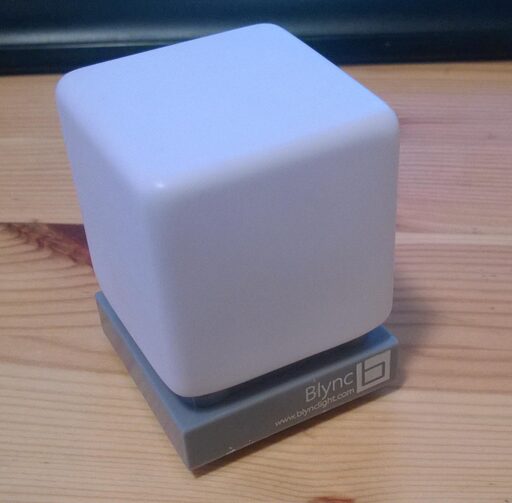
There is a funny little USB gadget called the Blync identified by VID: 0x1130, PID: 0x0001. It’s a glowing RGB cube, but it has two defects for me: the driver is only available for Windows only 7 colors are available Let’s fix it. Software hack That’s the easy part. Plug your Blync under Windows running in a virtual machine. Start Wireshark under the Linux host Dump USB packets Think Replay packets in Python And Voilà: https://github.com/ticapix/blynux ...

March 3, 2014 · 3 min · 521 words · ticapix